CAPTCHA Bypass in Browser Automation: What Works, and When a Person Should Solve It

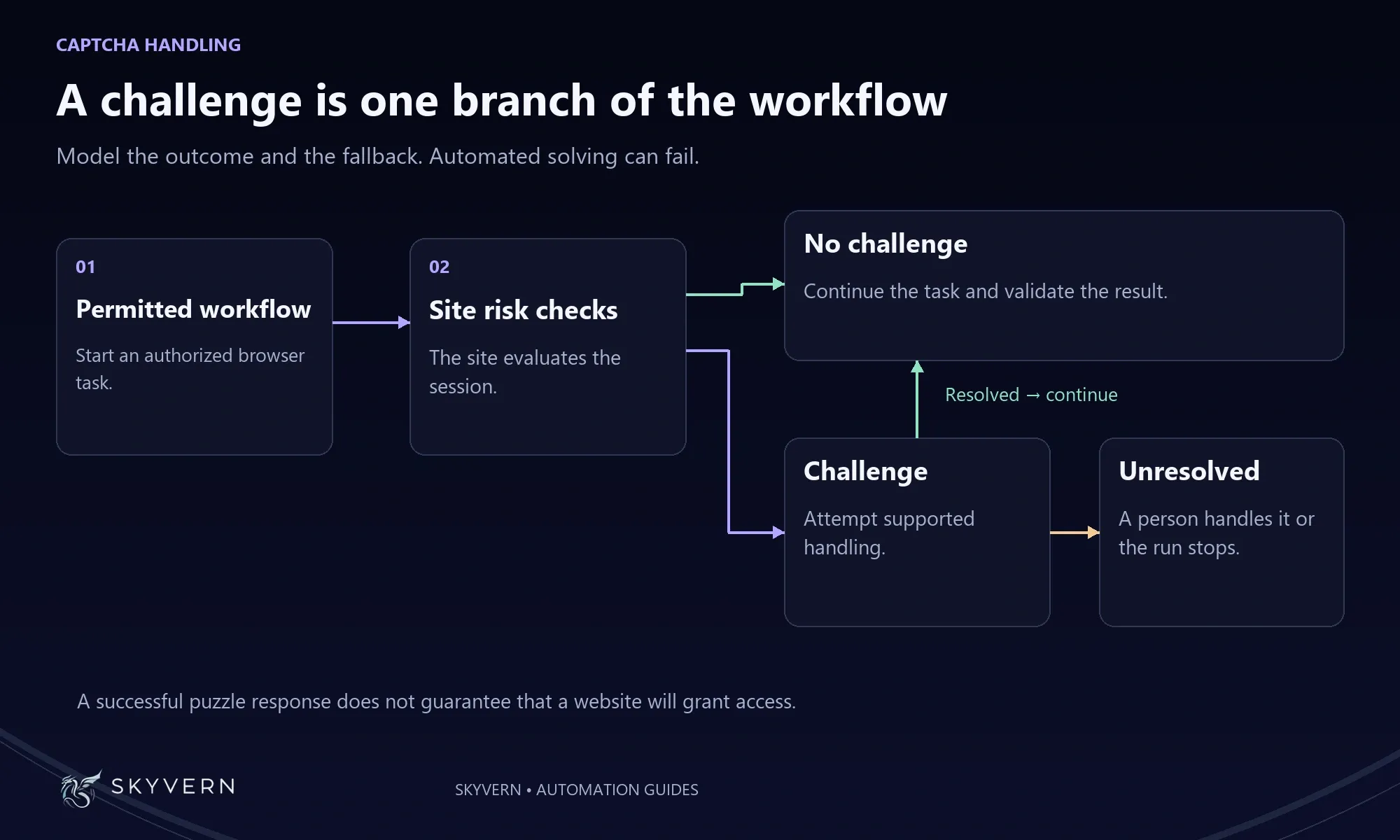
CAPTCHA bypass in browser automation means getting an automated run past a CAPTCHA, either by solving the challenge, by triggering fewer of them, or by handing the challenge to a person.
If you automate work on websites, you will meet CAPTCHAs at some point. They tend to show up at logins, on search forms and before a form is submitted. Buyers ask us about them very often on sales calls.
This guide covers sites your team is authorized to automate: portals you have an account on, public lookups you're allowed to query at volume, forms you submit on behalf of your own organization. It compares the four ways teams handle CAPTCHAs, explains why automated runs trigger them in the first place, and shows where a person should step in.
The short version for Skyvern: Skyvern Cloud solves common CAPTCHAs during a run, including reCAPTCHA, hCaptcha, Cloudflare Turnstile, FunCaptcha, MTCaptcha and text CAPTCHAs.
Why automated runs hit CAPTCHAs
Sites show CAPTCHAs based on how risky a visit looks, so the cheapest way to deal with them is to look less risky. A run that never triggers a challenge doesn't need to solve one.
Modern CAPTCHA systems score the visit before they decide whether to show a puzzle. Google's reCAPTCHA v3 returns a score for each request based on how the visitor interacts with the site, and the site owner picks the threshold that triggers extra checks. Cloudflare's Turnstile runs small background JavaScript checks on the browser and adjusts the difficulty to that visitor, often without showing a puzzle at all. Researchers at ETH Zurich found that reCAPTCHA v2 also relies heavily on cookie and browser history data when deciding whether someone is human.
An automated browser trips these checks in a few ways:
- IP address. Traffic from data center IP ranges looks automated. Shared networks cause trouble too. Google tells people who see its "unusual traffic" message that other users on the same VPN or network may be sending automated searches.
- A fresh browser every time. A browser with no cookies and no history has nothing to vouch for it.
- Pace. Many requests in a short time, or many runs hitting the same site at once, look like a bot.
- Automation signals. Browsers driven by automation tools expose flags that detection scripts look for.
- Mismatched details. A US residential IP with a European time zone doesn't look like a real visitor.
Skyvern handles part of this by default: every browser launches with automation flags removed, and its time zone follows the proxy location. When a site still blocks runs, our docs recommend these steps, in this order:
- Use a residential proxy. Data center IPs are the most common block signal. For logins, a static ISP proxy keeps the same IP from run to run.
- Keep the same browser. A browser session keeps cookies and the IP across steps. A browser profile brings back a browser that already passed the check.
- Slow down. Add a wait between rapid actions.
- Hand it to a person when nothing else works. The last section covers how.
Residential proxies and state- or city-level targeting are on the Pro and Enterprise plans, according to our pricing page. Hobby runs use data center IPs with country-level targeting.
Four ways to handle CAPTCHAs in automation
There are four ways to get a run past a CAPTCHA. They differ mostly in who does the work: you, a third-party service, or the platform running your browser.
| Approach | How it works | Examples | Best for |
|---|---|---|---|
| Solver API | Your code sends the challenge to a service and gets the answer back | 2Captcha, Anti-Captcha, CapSolver, DeathByCaptcha | Teams that run their own browsers and scripts |
| Browser extension | An add-on solves challenges inside the browser | Buster, NopeCHA, extensions from the solver services | Light, occasional use |
| DIY models and stealth browsers | You build the solving and the evasion yourself | Vision models, patched browsers | Engineering teams with time to maintain it |
| Built-in solving | The automation platform detects and solves challenges during the run | Browserless, Skyvern | Teams that don't want to own the CAPTCHA plumbing |
Solver APIs
A solver API is a paid service that solves challenges for your script. Your code sends the challenge, the service returns a token or an answer, and your script submits it to the page. You pay per solved CAPTCHA.
The services differ in how much of the solving is done by people:
- 2Captcha says most tasks are solved by AI models, and that it routes low-confidence tasks to human workers.
- Anti-Captcha says all of its CAPTCHAs are solved by human workers.
- DeathByCaptcha describes a hybrid of AI-based OCR and a 24/7 team of human solvers.
- CapSolver describes AI-based solving and offers APIs, SDKs, a browser extension and an MCP integration for AI agents.
Solver APIs work with any browser setup, which is why developers running Selenium, Playwright or Puppeteer use them. The cost is the integration: someone writes and maintains the code that detects the challenge, calls the API, injects the answer and handles failures. The challenge also leaves your environment, and with human-backed services a person somewhere sees it.
Browser extensions
Extensions solve challenges inside the browser itself. Buster is an open-source extension that completes reCAPTCHA audio challenges with speech recognition when you click its button. NopeCHA is an AI-based extension with a free tier of 100 recognitions a day for personal projects. 2Captcha, Anti-Captcha and CapSolver also publish extensions.
Extensions suit a person browsing or a small script on one machine. For production runs you still have to manage the browsers they live in, keep them updated and watch for failures.
DIY models and stealth browsers
Some teams build the solving themselves. Image challenges are solvable with off-the-shelf vision models: the ETH Zurich study solved 100% of the reCAPTCHA v2 image challenges it tested, using YOLO image models. Stealth tooling, such as patched browsers and plugins that hide automation flags, aims to avoid challenges in the first place.
This route has no per-solve fee, but it costs engineering time. CAPTCHA providers keep changing their checks, so a home-built setup needs someone to notice when it stops working and fix it. If your team has no engineer to own it, this route is hard to keep running.
Built-in solving in an automation platform
Some browser automation platforms detect and solve CAPTCHAs as part of the run, so nobody writes solver code. Browserless solves challenges on the browsers it hosts when you add a setting to the connection URL, and charges 10 units per successful solve.
Skyvern Cloud solves challenges automatically during a run, alongside the proxy network, stored credentials and the steps of the workflow itself. Every plan includes a solver: Basic on Hobby, Advanced on Pro, and Elite on Enterprise (pricing).
Built-in solving only works on the platform's hosted browsers. Browserless says its solving doesn't reach a browser on your own machine. Self-hosted Skyvern doesn't solve CAPTCHAs either: when the agent sees one, it waits 30 seconds so you can solve it in the browser window, then continues.
Which CAPTCHA types solvers handle
CAPTCHA types differ in what they ask for, and that changes how they get solved and what they cost.
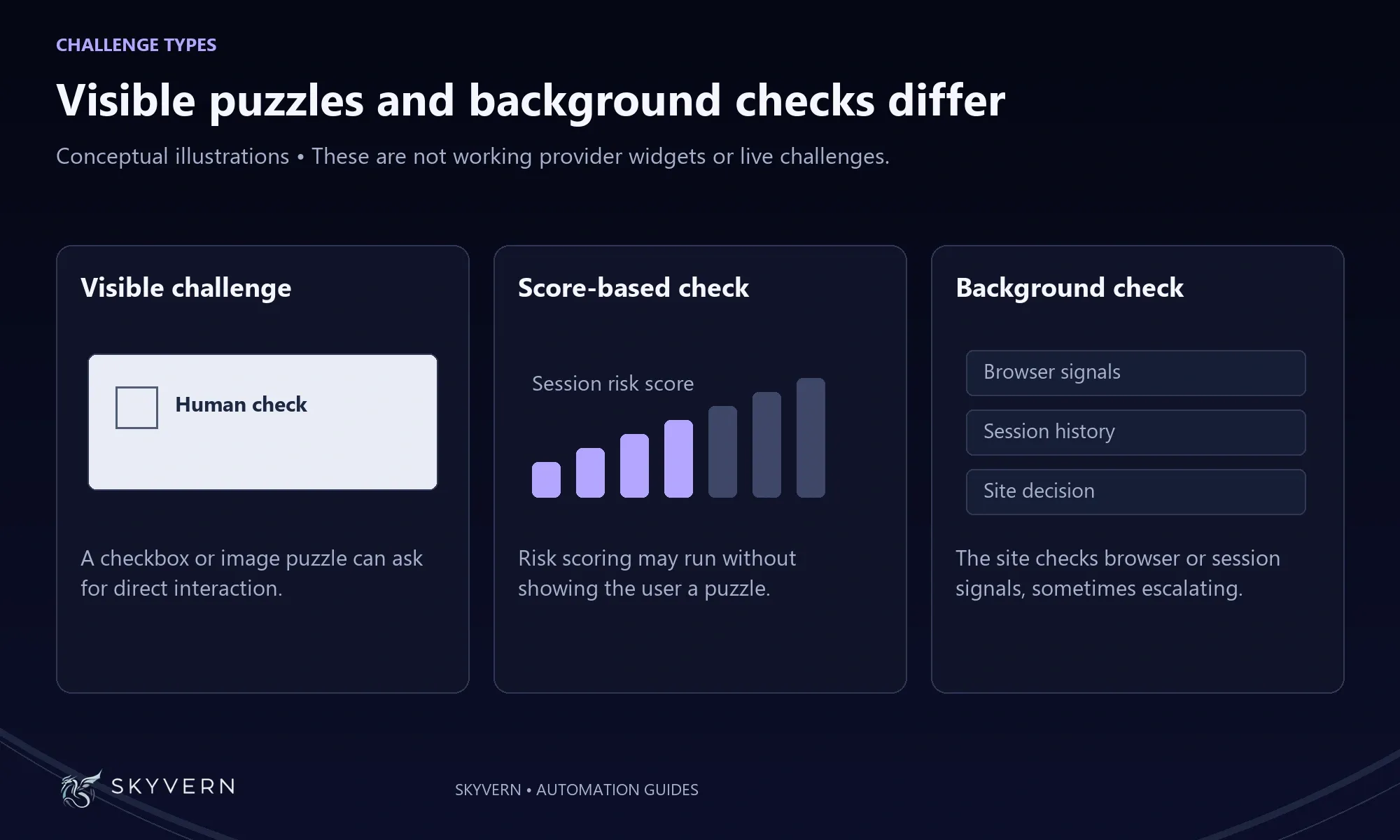
- Image and checkbox challenges, such as reCAPTCHA v2 and hCaptcha, ask the visitor to click a box or pick matching pictures. Solvers return the answer or a token.
- Score-based checks, such as reCAPTCHA v3, show no puzzle. The site gets a score, so how the visit looks matters as much as any solver. 2Captcha prices reCAPTCHA v3 by score: $1.45 per 1,000 for a score of 0.3 or lower and $2.99 per 1,000 above it.
- Background checks such as Cloudflare Turnstile run in the browser and may never show a challenge.
- Puzzle CAPTCHAs such as Arkose Labs FunCaptcha ask the visitor to rotate or match objects. They can be expensive to solve: 2Captcha lists them at $1.45 to $50 per 1,000.
- Text CAPTCHAs ask the visitor to type distorted characters. They are often among the least expensive types.
Skyvern Cloud covers reCAPTCHA, hCaptcha, Cloudflare Turnstile, FunCaptcha, MTCaptcha and text CAPTCHAs. Some Cloudflare challenges loop through several pages, so our docs suggest raising the run's step limit for sites behind them.
Human challenge handoff
A person should solve the challenge when automated solving fails or when you don't want a machine answering it. The rest of the run stays automated, so the person handles the exception instead of the whole task.
There are three common reasons to hand a challenge to a person:
- The solver failed. No solver clears every challenge, and a person can get a stuck run moving again.
- The step is sensitive. For a login on a regulated portal, or an account your team can't afford to have locked, you may prefer a person to answer.
- It's rare. If a site shows a challenge once a month, a person is cheaper than building around it.
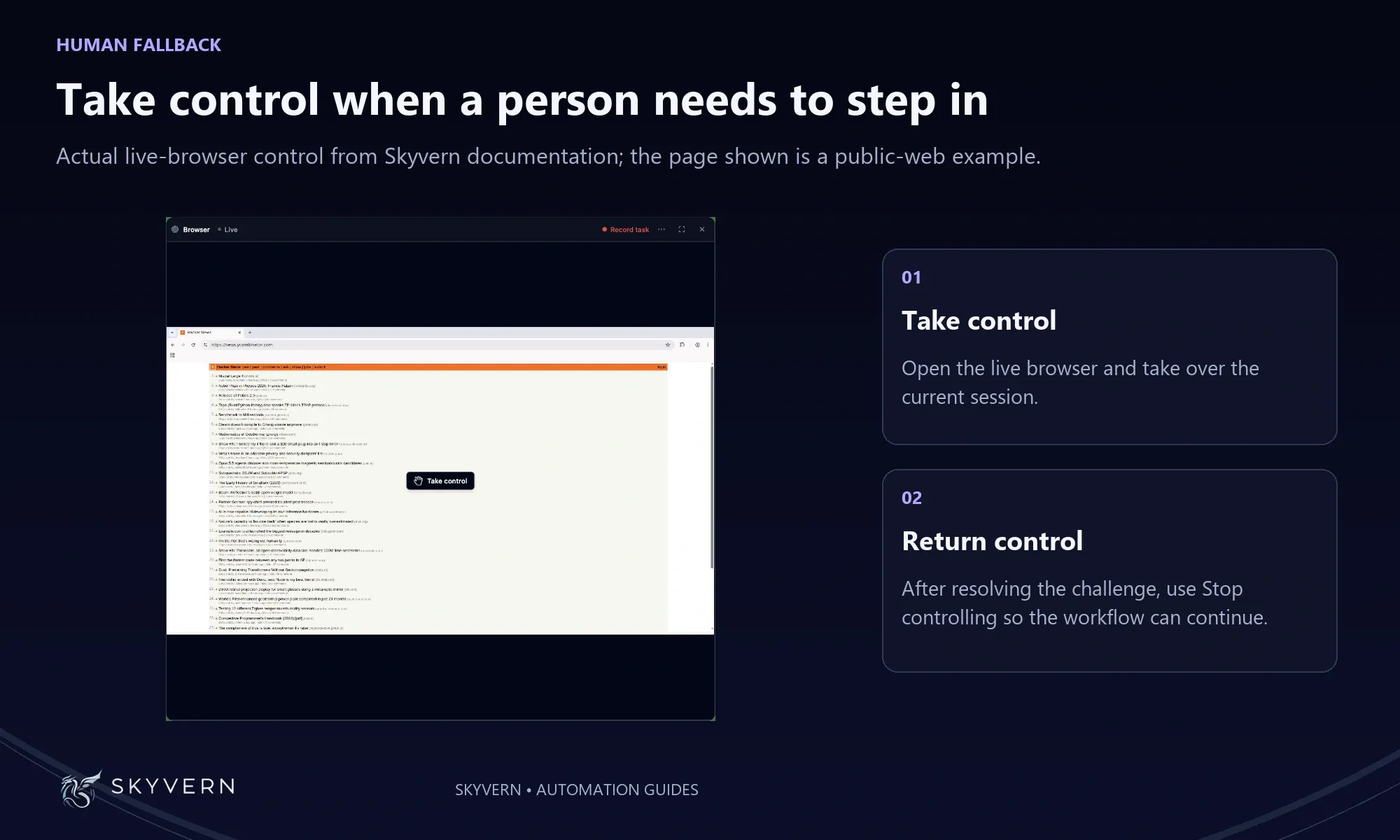
In Skyvern, someone on your team can open the run in the app, click Take control on the live browser, solve the challenge, then click Stop controlling. The run continues where it stopped. Workflows can also include a human interaction step that pauses the run until a person acts. Human-in-the-loop is listed on the Enterprise plan on our pricing page. Browserless offers a similar fallback through its live sessions.
This split lets a team take on more runs without adding people. One person can oversee many runs and step in only when a challenge or an odd case needs them.
CAPTCHAs on the portals Skyvern customers automate
The challenges our customers hit tend to sit on the same steps of their workflows: the login, the search form and the final submit. reCAPTCHA's own documentation recommends adding checks to forms and actions, so expect them wherever a portal accepts input.
Three kinds of work come up often:
- Healthcare portals. Eligibility checks, prior authorization status and claim lookups start with a login, sometimes with a second factor. Stored credentials and 2FA support keep the login step automated, and a residential or static ISP proxy keeps the IP consistent between runs.
- Public license and registry lookups. Credentialing teams check licenses on state boards and registries one provider at a time. Pacing matters here. Spacing out lookups and reusing one browser session look more like a person working through a list than a burst of searches.
- Job-application forms. Products that submit applications for job seekers fill forms on applicant tracking systems, which can show a challenge before the final submit.
For the login side, see how Skyvern handles authentication. For the wider set of bot checks beyond CAPTCHAs, see our guide to anti-bot detection tools for enterprise automation. To see how often a site blocks your runs, filter runs whose failure category is ANTI_BOT_DETECTION.
Is bypassing a CAPTCHA legal?
Whether it's legal depends on the site's terms, your authorization to use the site and where you operate. This section isn't legal advice.
A CAPTCHA tells you the site owner wants to limit automated access, and many sites' terms of use restrict automation. Having an account does not by itself give you permission to automate access or solve its challenges. Read the terms of each site you plan to automate, and ask the site owner or your legal team when they're unclear.
Skyvern's terms of service require customers to have the authority to automate the websites they point Skyvern at, and to be authorized to use automation tools with any third-party login they provide. The terms also prohibit circumventing security measures or access controls. Confirm that the intended workflow is permitted under both sets of terms before deploying it.
Make CAPTCHA handling part of your Skyvern workflow
For a portal you are authorized to automate, evaluate CAPTCHA handling as part of the whole job: logging in, completing the task and recovering when a challenge needs a person. Skyvern combines saved credentials and reusable browser sessions with integrated CAPTCHA support, so those steps can live in the same workflow.
Basic CAPTCHA solving is included on Hobby, the Advanced solver on Pro, and the Elite solver on Enterprise. A supported solver still cannot guarantee that every challenge will pass. Skyvern's run logs help you investigate failures, and live browser takeover lets an operator complete a challenge and return control to the agent. That gives your team a practical recovery route when automatic handling is insufficient.
Book a Skyvern demo for your portal workflow. Bring the challenge types you encounter, how often they interrupt runs and who can intervene. You can assess the appropriate CAPTCHA features and plan against those requirements before committing to production use.
Frequently asked questions
Can AI solve CAPTCHAs?
AI can solve many CAPTCHAs, especially image challenges. The ETH Zurich study solved every reCAPTCHA v2 image challenge it tested and found no significant difference in how many challenges bots and humans had to solve. That result describes the study’s test conditions, not a guaranteed solve rate on every website. Systems such as reCAPTCHA v3 and Turnstile also evaluate browser and interaction signals.
Why do I keep getting CAPTCHAs?
You keep getting CAPTCHAs because the site rates your traffic as risky. For a person, Google says the usual causes are automated traffic from your network, such as a shared VPN, or malware on a device. For an automated run, the usual causes are data center IPs, fresh browsers with no cookies, fast or parallel requests and visible automation flags.
How much do CAPTCHA solvers cost?
CAPTCHA solvers charge per 1,000 solved challenges, and the price depends on the type. These are the published prices as of November 8, 2026:
- 2Captcha: $1 to $2.99 per 1,000 for reCAPTCHA v2, and $1.45 per 1,000 for Cloudflare Turnstile (pricing).
- Anti-Captcha: from $0.50 per 1,000 image CAPTCHAs, and $0.95 to $2 per 1,000 for reCAPTCHA v2, with volume discounts (pricing).
- NopeCHA: a free tier of 100 recognitions a day for personal projects.
- Browserless: 10 units per successful solve.
- Skyvern: a CAPTCHA solver is included in every Cloud plan (pricing).
Which CAPTCHA solution is best for AI agents at scale?
The best solution for AI agents at scale depends on who runs the browsers. If your team runs its own browsers and already writes the automation code, a solver API fits into that code. If you'd rather not run browsers, proxies and solving yourself, a platform with built-in solving handles them as part of each run. With Skyvern, you describe the task, the run handles the login, the proxy and the challenge, and a person can take over when a challenge gets through.
Keep reading
5 Best AI Browser Agents in 2026
The best browser agents can reliably and repeatedly handle jobs you would do by clicking through a web browser, like filling out a form, collecting documents, or updating customer records. So if you’re tired of wasting time filling out forms and clicking dropdowns, this article is for you. Before I continue, full disclosure: I am Skyvern’s CEO, a browser agent SDK written in Python built to automate workflows. It’s built specifically to handle complex business workflows, like dealing with heav

Page Object Model (POM) in Test Automation
I know why you’re looking into Page Object Model: you’re tired of fixing the same CSS selectors across five different tests every time someone changes a form. You copied the login steps a few times, the test suite grew, and now a small UI change means an afternoon of maintenance. POM gives those repeated interactions a home. Your test scripts call a method like signIn(), and a page object handles the fields and buttons underneath. When a shared selector changes, you have one place to fix it. I
What Is Playwright MCP Server? How It Works and When to Use It (May 2026)
Playwright MCP Server connects AI coding assistants to browsers so they can automate web interactions conversationally. You describe a test scenario, the assistant spins up Playwright, executes the steps, and returns results. That flow works well for generating new tests or working through unfamiliar UIs. Where it starts breaking down is high-volume regression testing, stable workflows with fixed selectors, or production pipelines where token overhead compounds fast. TLDR: * Playwright MCP Se
Put the browser to work
Use Skyvern for the work that lives in a browser.
Turn repetitive browser tasks into reliable workflows with Skyvern.